
Free billing and collections review workbook
Review collections and unpaid balances.
Compare insurance cash received across three completed periods. Review unpaid insurance balances, the share over 90 days and open initial-denial balances at period end, then assign follow-up questions to a responsible role. Use aggregate reports in your approved workbook environment.
Download the billing and collections workbook (XLSX)XLSX · 2 worksheets · 9256 bytes
Understand the billing measures behind the review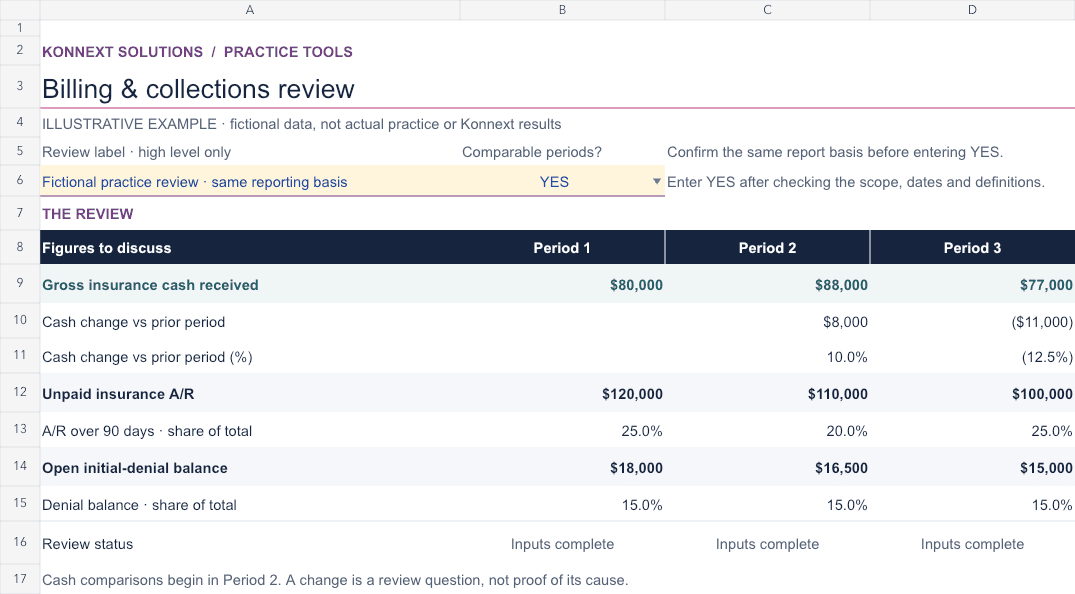
What is inside?
Insurance collections across periods
Compare confirmed insurance cash receipts when periods and reporting basis are comparable.
Unpaid insurance balance review
See total A/R, balances over 90 days and open initial-denial balance shares without double-counting overlap.
Follow-up priorities and ownership
Record the question, next review step, responsible role and review date.
Compare consistent reports before drawing conclusions.
Insurance cash is received during a period; unpaid insurance A/R is measured at a period-end cutoff. Balances over 90 days and open initial-denial balances may overlap, so do not add them together. Initial-denial balance share is not a claim denial rate. Review the report basis and any unanswered question before interpreting a change.
Review insurance A/R scope and follow-up ownershipReview aggregate figures without sharing detailed records.
Enter aggregate insurance cash and balances only in your downloaded copy. Do not enter patient, provider or claim details, personal identifiers, account or bank details, credentials, system links or file paths. Keep supporting records and completed workbooks in your approved secure environment; do not send them through a public website form.
No email or account is required. The page does not collect workbook inputs or accept completed files. This review does not establish profit, explain a billing cause, predict collections or replace qualified review.
Questions about the billing and collections workbook
What figures do we enter?
Use gross confirmed insurer cash receipts for each completed period and unpaid insurance balances at each period-end cutoff. Keep the report basis consistent and do not net outgoing insurer refunds into receipts. A remittance or posting alone does not prove receipt. Exclude billed charges, patient receipts and expected payments.
Can we add aged and denied balances together?
No. An open denied balance may also be over 90 days old. Both are subsets of total unpaid insurance A/R and may overlap.
Is the initial-denial balance share a denial rate?
No. It divides an open insurance balance by total unpaid insurance A/R. It is not the share of submitted or adjudicated claims that were denied, and it does not establish a cause or recovery outcome.
Do we need an email or upload our reports?
No. Download the blank workbook without an email or account and use it in your approved environment. Do not upload reports, detailed records or a completed workbook through a public form.
Need help with recurring billing work?
Review Konnext’s billing activities, report categories and account-contact approach. Any records-based work and follow-up responsibilities depend on an agreed engagement; workbook figures do not establish recoverability or guarantee payment.